この猫は世界中の猫エージェントに秘密のシグナルを送っているw
アメリカ
猫催眠術!スゲー!
オーストラリア
かわいいいいいいいいいいいいいいいいいいいいいいいいいいいい
大勢
この猫は世界中の猫エージェントに秘密のシグナルを送っているw
アメリカ
猫催眠術!スゲー!
オーストラリア
かわいいいいいいいいいいいいいいいいいいいいいいいいいいいい
大勢
zshのインクリメンタル履歴検索でglobを使う。
% zsh --version
zsh 4.3.9 (i386-apple-darwin10.0)
Snow Leopardのzshは古くて使えないのでhomebrewで新しいのを入れる。
% brew install zsh
% sudo vi /etc/shells
/Users/komagata/homebrew/bin/zsh
% chsh -s /Users/komagata/homebrew/bin/zsh
ログインしなおす。
% zsh --version
zsh 4.3.11 (i386-apple-darwin10.6.0)
% vi ~/.zshrc
bindkey '^R' history-incremental-pattern-search-backward
bindkey '^S' history-incremental-pattern-search-forward
% source ~/.zshrc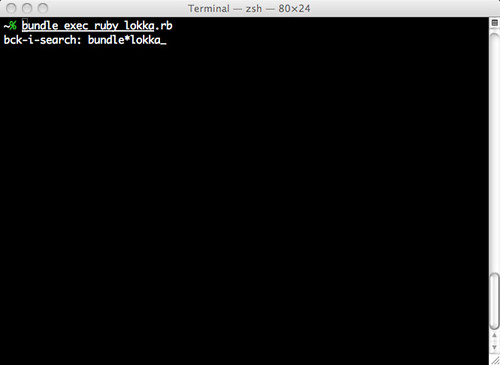
OMG!
参照:zsh設定超便利 history-incremental-pattern-search-backward - って、なんでですか〜 - subtech
さくらインターネットのVPSにDebian Squeezeをインストールする。
デフォルトのCentOSでネットワークの設定を記録しておく。
# cat /etc/sysconfig/network-scripts/ifcfg-eth0
# cat /etc/resolv.conf
installerをダウンロードする。
# mkdir /boot/new
# cd /boot/new
# wget ftp://ftp.jp.debian.org/pub/Linux/Debian/dists/squeeze/main/installer-amd64/current/images/netboot/debian-installer/amd64/initrd.gz
# wget ftp://ftp.jp.debian.org/pub/Linux/Debian/dists/squeeze/main/installer-amd64/current/images/netboot/debian-installer/amd64/linux
grubからinstallerを起動できるようにする。
# /boot/grub/grub.conf:
(...)
title new squeeze amd64
        root (hd0,0)
        kernel /new/linux ro root=LABEL=/ console=tty0 console=ttyS0,115200n8r
        initrd /new/initrd.gz
rebootしたらgrubのmenuでinstallerが選べるのでインストールする。
Gmailのロックを外す方法。
Gmailでは短期間に何度もログインしたりするとアカウントにロックがかかるらしい。下記の方法でロックを解除できる。
クライアントでユーザー名とパスワードが受け入れられません - Gmail ヘルプ
[PASSWORD]:535-5.7.1 Username and Password not accepted. Learn more at
[PASSWORD]:535 5.7.1 http://mail.google.com/support/bin/answer.py?answer=14257
MUAのログには上記のように出るが、Railsのエラーでは1行目しか出ないのでロックがかかっていることに気付くのが難しい・・・。
RailsでGmailを使ってメールを送る。(Google Appsも可)
# config/environments/development.rb:
(...)
  config.action_mailer.smtp_settings = {
    :address              => 'smtp.gmail.com',
    :port                 => 587,
    :domain               => 'example.com',
    :user_name            => 'foo@example.com',
    :password             => 'password',
    :authentication       => 'plain',
    :enable_starttls_auto => true
  }
(...)
下記を設定しないとエラーを表示してくれないところに注意する。
config.action_mailer.raise_delivery_errors = trueSend email with Rails by using Gmail. (Google Apps too)
If the following are not set, the error is not displayed.
Generators Slim - Issues - plataformatec/devise - GitHubI'm exec this generate for slim, but the code created is erb...
$ rails g devise:views usuarios -e slim
  create  app/views/usuarios
  create  app/views/usuarios/confirmations/new.html.erb
  create  app/views/usuarios/mailer/confirmation_instructions.html.erb
  create  app/views/usuarios/mailer/reset_password_instructions.html.erb
  create  app/views/usuarios/mailer/unlock_instructions.html.erb
  create  app/views/usuarios/passwords/edit.html.erb
  create  app/views/usuarios/passwords/new.html.erb
  create  app/views/usuarios/registrations/edit.html.erb
  create  app/views/usuarios/registrations/new.html.erb
  create  app/views/usuarios/sessions/new.html.erb
  create  app/views/usuarios/shared/_links.erb
  create  app/views/usuarios/unlocks/new.html.erb
josevalim February 11, 2011 | link
You need devise master to do that.
READMEに書いてあるけど、deviseでhaml or slim(-eオプション)使いたかったら1.1.7じゃ駄目でmaster使えとのこと。1.2rcが正式になったら使えるようになるかも。
Lokkathon #2が開催されました。
場所はFJORDのオフィス。参加者は@komagata, @machida, @kyanny, @junya, @mochizの5人。
努めてモクモクと作業。とてもはかどったし、皆さんとも話せてとても楽しかったです。
僕はGithubのIssuesを整理したり、Pull Requestを処理したり、バグを潰したりしていました。@machidaさんはデザイン系のIssueをやってくれました。@kyannyさんはAWS Elastic BeanstalkでLokkaを動かそうという作業。@mochizさんは会社のブログをLokkaにしようという作業。そして@junyaさんはLokkaにrspec2によるテストの環境をコミットしてくれました。
何か発表する勉強会や交流する懇親会もいいけどひたすらコードを書くHackathonも良いですね。皆さんのお陰で色んな方位に一気にLokkaの作業が進んだ気がします。ありがとうございました。
ゆるい会なので月1ぐらいでやっていきたいなと思います。
$ sudo -s
# bash < <( curl -L http://bit.ly/rvm-install-system-wide )
# rvm install 1.8.7RubyでのUUIDのversion 1の使い方。
gem install uuid>> require 'rubygems'
=> true
>> require 'uuid'
=> true
>> UUID.new
=> MAC: 58:55:ca:f3:26:47 Sequence: 9499
>> UUID.new.generate
=> "bc66c930-22f1-012e-251b-5855caf32647"
>> UUID.new.generate :compact
=> "be64e03022f1012e251b5855caf32647":compactはハイフンを取ってくれる。
How to use UUID Version 1 in Ruby.
:compact option omits the hyphens.